

SECURITY SYSTEMS SOLUTIONS
-
 Access Control
-
 Asset Tracker
-
 Automatic Door
-
 Baggage Scanner
-
 Bell Timer
-
 Boom Barrier
-
 BMS
BMS
-
 Burglar Alarm
-
 Canteen Management
-
 CCTV Camera
-
 Video Analytics
-
 Anpr Camera
-
 People Counting Camera
-
 Central Vacuum Cleaner
-
 DFMD
DFMD
-
 Electric Fence
-
 EAS
EAS
-
 Fire Alarm
-
 Fire Hydrant
-
 Fire Suppression
-
 Flap Barrier
-
 Garage Door
-
 Gas Detector
-
 Gate Automation
-
 GSM Communicator
-
 Guard Patrol
-
 HHMD
HHMD
-
 Home Automation
-
 Home Theatre
-
 Hotel Door Lock
-
 ID Cards
-
 Smart Lights
-
 IP Network
-
 Nurse Call System
-
 Occupancy Sensor
-
 PA Systems
-
 Payroll Software
-
 Road Blocker
-
 Smart Lock
-
 Time Attendance
-
 Tripod Turnstile
-
 UVSS
UVSS
-
 Vehicle Gps Tracker
-
 Video Door Phone
-
 Smart Parking System
-
 Visitor Management
-
 Wireless Communication
CCTV Outdoor PTZ Camera
CCTV Outdoor Speed Dome Cameras — commonly known as PTZ Cameras — can move side to side (pan), up and down (tilt), and zoom in and out (zoom). A PTZ camera is also called a Speed Dome Camera.
These Speed Dome PTZ cameras are designed for outdoor use, built to withstand various weather conditions (weatherproof), equipped with internal heaters, and engineered to operate reliably in challenging lighting environments. Their robust construction makes them ideal for long-term surveillance needs.
You can control PTZ cameras using a remote control, joystick keyboard, or computer software. A Speed Dome Keyboard (Controller) and the camera’s On-Screen Display (OSD) menu let you configure advanced features such as Presets, Tours, and Patterns.
What do I need to use a Speed Dome / PTZ Camera?
To use a Speed Dome PTZ Camera, you will need two things:
- A display device
This device displays the live video feed from the PTZ camera. It can be a monitor, TV, or computer screen. - A control device for Pan, Tilt, and Zoom
You can use:- A dedicated joystick controller that is sold with most PTZ cameras.
- DVR/NVR software on your computer that allows PTZ camera control.
We also offer compatible DVRs and NVRs for PTZ surveillance setups.
Coming out of a PTZ Speed Dome Camera are three connections: the power connector, the video cable, and the PTZ control wires.
- The power cable connects to the power adapter.
- The video cable connects to your display device (it does not need to run to the same location as the control wires).
- The control wires connect to either the joystick controller or your computer if you are using a DVR card.
Can I use multiple PTZ Cameras?
Absolutely. You can use multiple PTZ cameras and operate them from the same controller or DVR. You will need to ensure:
- All PTZ cameras use the same protocol and baud rate.
- Each camera has a unique camera ID number (1–255).
These camera numbers are usually set with dipswitches on the cameras.
On the joystick, simply select the desired camera ID to switch control.
What are touring and cruising?
“Touring” and “cruising” mean the same thing in the context of PTZ cameras.
With your PTZ camera, you can create multiple presets.
A tour/cruise automatically moves the camera from one preset to another in a predefined sequence.
For example, you may program 10 presets (door, window, sidewalk, cash counter, etc.). When you activate touring, the PTZ camera cycles through these presets at set intervals.
What are presets?
Presets allow you to instantly move your PTZ camera to predefined positions.
If you have important locations such as a doorway, hallway, or gate, you can set each one as a preset. After assigning a preset number, you can instantly return the PTZ camera to that exact position at any time. No matter where the camera is currently pointing, recalling the preset will quickly reposition it to your saved angle, tilt, and zoom.
SD50430I-HC | CCTV Outdoor Speed Dome Cameras
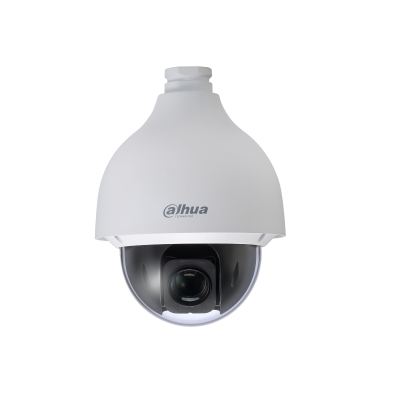
4MP 30x PTZ HDCVI Cameras
- 1/3” 4Megapixel CMOS
- Powerful 30x optical zoom
- 120dB true WDR, 3D DNR
- Max. 25/30fps@4M/1080P, 25/30/50/60fps@720P
- IP67, IK10
